


True Mirror OnlineYour face everyone else sees
Open your free true mirror camera and switch between your familiar reflection and the unmirrored view. Compare one frame side by side, explore each half of your face, and save your own comparison card.
A different side of you.
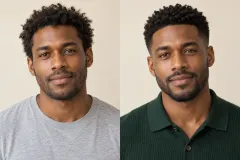
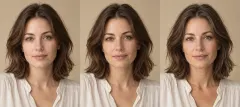
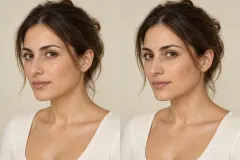
The face you know from the mirror, beside the orientation other people see.
Free · No sign-up · No uploads
Your camera and photos stay in your browser. Nothing is recorded or uploaded. Comparison cards are created on your device and exported only when you share or download.
Prefer a physical mirror? Read our guide to making a true mirror for the setup and alignment checks.
01 / Start your camera
Allow camera access and look straight ahead in even light. A local photo works too.
02 / Change perspective
Try Mirror, True, Side by side and Halves. Freeze a moment to take a closer look.
03 / Keep the comparison
Create your card, optionally hide your face, then download the PNG or share it.
Why the true view feels unfamiliar
The reflection is the version of yourself you see most often. Other people are familiar with the opposite arrangement. A flip swaps the position of your hair part, the height of a brow and the tiny differences in your smile. Your features stay the same; the familiar arrangement changes.
Unfamiliar is not a beauty score.
Move the camera a little farther away, keep it at eye level and relax your expression. Comparing the same frame helps separate orientation from selfie perspective.
Want to inspect specific left-right differences? Try the free face symmetry test for landmark-based regional measurements.
Mirror, selfie or photo: which view is flipped?
| Where you see yourself | Orientation | What to know |
|---|---|---|
| An everyday mirror | Reflected | The orientation you have grown familiar with. |
| A selfie preview | Usually reflected | Makes framing feel natural; behaviour depends on the camera app. |
| A saved selfie | Depends on settings | Check the mirror or save-selfie setting on your phone. |
| Your video-call self-view | Usually reflected | Other participants usually receive the unreflected orientation. |
| A photo taken by someone else | Usually unreflected | Distance, the lens and later edits still affect the image. |
| True view on this page | Unreflected | Preserves the frame supplied by the camera. |
Two halves. Two different composites.
Halves view does more than cut the camera frame down its centre. It locates facial landmarks, aligns the eye axis and reflects each side across a fitted midline. These composites make natural differences easier to explore; they are not ideal faces to aim for. Keep your head facing the camera, since turning and occlusion still affect the result.
Frequently asked questions
What is a true mirror online?
A true mirror online displays your camera feed without the horizontal reflection used in a familiar mirror preview. Switch between orientations or compare both versions of the same frame.
Is the true mirror camera how others see me?
It matches the left-to-right orientation someone facing you sees. A camera is still a flat image: lens distance, angle and lighting affect it, and people see you in motion and in three dimensions.
Why does my face look strange in a true mirror?
You have had years to get used to your reflection. Switching the arrangement makes small differences stand out. The unfamiliar feeling does not mean your features changed or that your face is unusually asymmetric.
Which is more accurate, the mirror or a photo?
Both show the same face. A mirror reflects the image, while a photo may preserve the camera orientation or be flipped by a phone setting. Flipping does not alter your features; close selfie perspective can make a larger difference.
Is this the same as an inverted filter?
The common social-media inverted filter horizontally flips a mirrored preview. True view here shows the unreflected camera frame without beautification or reshaping.
What does the Halves view show?
It aligns the detected face to the eye axis and duplicates each side across a fitted midline. You see a left-left and a right-right composite. Head turn, occlusion and landmark errors can still affect the join.
Is my camera feed uploaded or recorded?
No. Camera frames, photos, face alignment and PNG cards are processed in this browser. A card leaves the page only when you download it or use system sharing. Stop & clear ends the camera stream and clears the current frame.
Can I use a photo instead of the camera?
Yes. Choose a local photo. A saved selfie may already be mirrored, and the tool cannot infer its editing history. True view preserves the orientation in your file.
Explore more free tools
Free Face Symmetry Test
Check facial symmetry free with an annotated selfie. Compare eyes, brows, nose, mouth and jaw across a fitted face midline. No login or photo upload to a server.
Open free tool →Free Face Shape Detector
Find your face shape from a photo for free. Compare oval, round, square, heart, diamond and oblong profiles with visible measurements and no signup.
Open free tool →Facial Ratios Calculator
Measure eight facial ratios free: FWHR-style width-to-height, midface, eye spacing, jaw width and more. Inspect every measurement on your photo.
Open free tool →